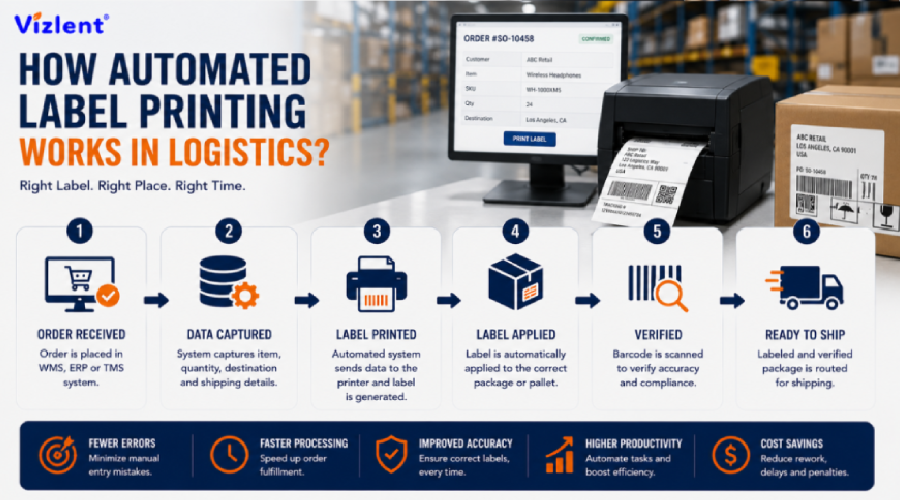
How automated label printing works in logistics comes down to three linked stages: a print engine generates the barcode and text, an applicator places the label onto the parcel at line speed, and a verification step confirms the print is scannable before the box moves on. This sequence typically runs at 60 to 150 or more packages per minute inside a modern fulfillment center. Understanding how automated label printing works in logistics is the starting point for any operations team deciding if they should upgrade from manual labeling to a fully automated line.
How Automated Label Printing Works in Logistics: The Core Sequence
How automated label printing works in logistics starts the moment an order is confirmed in the warehouse management system, which sends the shipping data to a print engine seconds before the parcel reaches the labeling station. The printer renders the barcode, address, and service level indicator onto the facestock, then a synchronized applicator arm or air-blast mechanism presses the label onto the box as it passes on the conveyor. A vision system typically scans the applied label within the same second to confirm placement and barcode grade before the parcel proceeds to sortation.
This entire sequence has to be completed without slowing the conveyor line, which means every component from the print engine to the label material itself has to be matched precisely to the line speed. Facilities moving thousands of parcels per hour cannot tolerate misfeeds, smeared print, or labels that lift off during transit, since each failure creates a manual rework step that undoes the efficiency gain automation was supposed to deliver. This is why operations teams researching how automated label printing works in logistics quickly discover that the printer hardware is only one part of a much larger system.
A single automated label system rarely operates in isolation; most fulfillment centers run several coordinated stations across parallel conveyor lines, each handling a different product category, carrier, or box size range. Coordinating multiple stations requires a shared network connection back to the warehouse management system, so that print data, scan results, and error logs stay synchronized across the entire facility. Facilities that treat each automated label system as an isolated island, rather than part of a connected network, tend to struggle when volume spikes during peak shipping seasons.
What Automated Labeling Machines Do on a Fulfillment Line
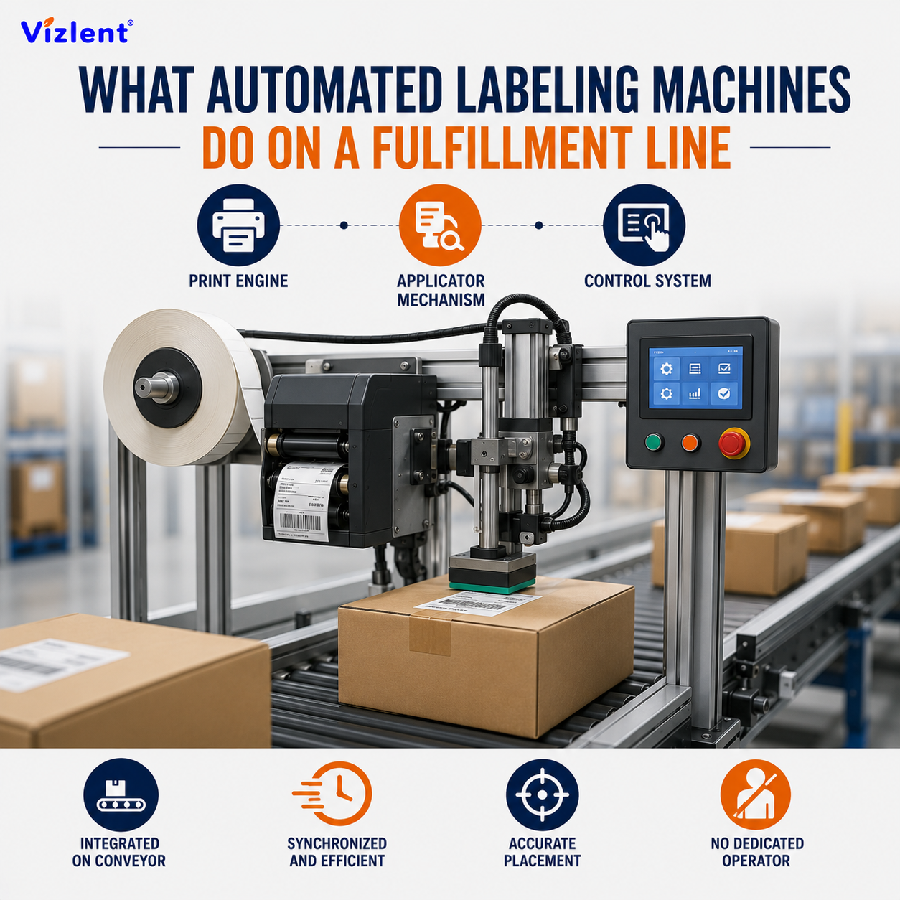
Automated labeling machines combine a print engine, an applicator mechanism, and a control system that coordinates timing with the conveyor line. The print engine generates the image using either direct thermal or thermal transfer technology, while the applicator physically transfers the label from the liner onto the parcel surface using a tamp, blow, or wipe method depending on the box geometry. Automated labeling machines are typically integrated directly into the conveyor structure so that labeling happens without a dedicated operator standing at the station.
Modern automated labeling machines also log data for every label applied, recording the barcode content, timestamp, and scan verification result for traceability purposes. This logging becomes essential when a carrier reports a misdelivered package, since the warehouse can trace exactly when and where that specific label was printed and applied. Facilities running high volumes typically operate several automated labeling machines in parallel, each dedicated to a specific product line, carrier, or package size range.
This logging capability is also where many operations managers first get a concrete answer to how automated label printing works in logistics at their own facility, since the data trail shows exactly which station, printer, and time stamp produced each label. Reviewing this log data periodically helps identify slow drift in print quality before it becomes a full-blown scan failure problem. Facilities that never review their own logging data tend to discover print quality issues only after a carrier flags a pattern of rejected labels.
Automatic Label Printer Technology: Direct Thermal vs Thermal Transfer
An automatic label printer used in logistics generally relies on one of two core technologies: direct thermal, which uses heat to darken a chemically treated facestock, or thermal transfer, which melts ink from a ribbon onto a standard facestock. Direct thermal printing is simpler and requires no ribbon, making it the common choice for short-term shipping labels that only need to stay legible for the length of a domestic parcel journey. Thermal transfer, by comparison, produces a more durable image and is preferred for labels that need to survive longer storage, outdoor exposure, or chemical contact.
Choosing the right automatic label printer configuration depends on how long the label needs to remain scannable and what environmental conditions it will face in transit. A facility shipping mostly domestic parcels with short transit times can standardize on direct thermal printers to reduce consumable costs and simplify maintenance. Operations handling international freight, cold chain shipments, or hazardous materials labeling typically need thermal transfer printers paired with a resin or wax-resin ribbon for image permanence.
Automatic Label Dispenser and Automatic Label Roller Mechanics
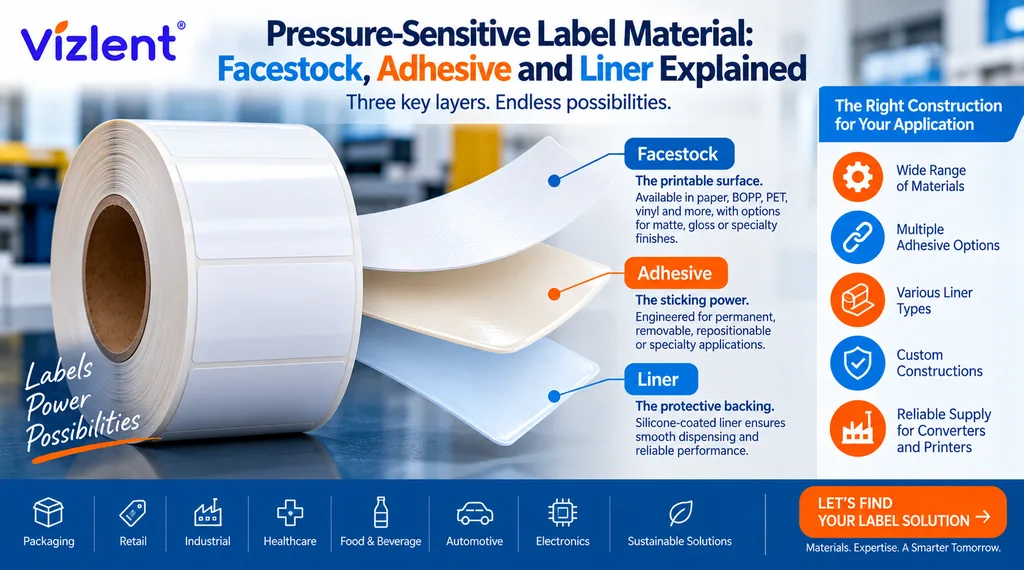
An automatic label dispenser peels the printed label away from its liner at the precise moment the applicator needs it, using a sharp-edged peel bar that separates the label from the backing material as it passes over. This mechanism has to release the label cleanly without curling the leading edge, since a curled label can misfeed or apply crookedly on the parcel surface. The automatic label roller assembly that feeds the liner through this peel point has to maintain consistent tension, because any slack or excess pull disrupts the timing of the entire print-and-apply cycle.
Getting the automatic label dispenser and roller mechanics right depends heavily on matching the liner material and release force to the specific hardware being used. A liner that releases too easily can cause labels to fall off the roll prematurely, while one that releases too stubbornly can cause the label to tear or misalign during the peel. Facilities troubleshooting frequent misfeeds should check liner specifications and release force data before assuming the fault lies with the applicator hardware itself.
Automated Labeling Systems: Core Components of the Print-and-Apply Line
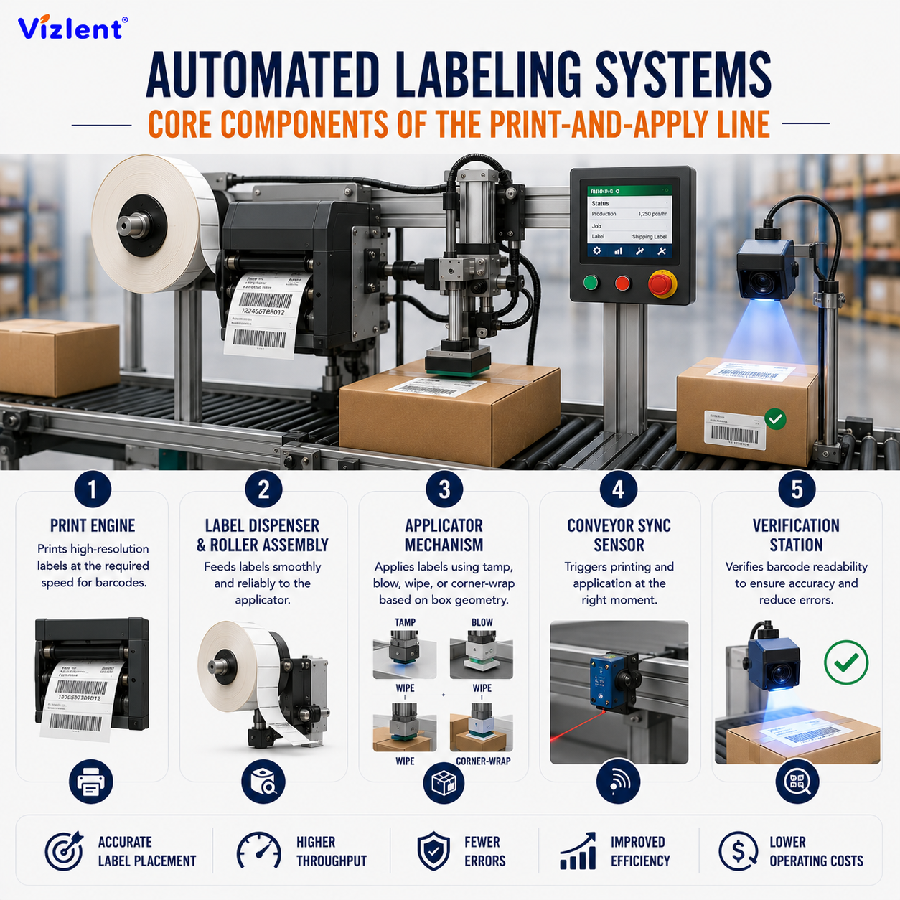
A complete automated labeling system is built from several coordinated components working in sequence:
- A print engine capable of the required resolution and print speed for the barcode format in use
- An automatic label dispenser and roller assembly that feeds labels cleanly to the applicator
- An applicator mechanism, such as tamp, blow, wipe, or corner-wrap, matched to the box geometry
- A conveyor synchronization sensor that triggers printing and application at the correct moment
- A vision or scanner-based verification station to confirm barcode readability before the parcel proceeds
Each of these automated labeling systems components has to be specified together rather than purchased piecemeal, since a mismatch between print speed and conveyor speed, or between liner type and applicator tension, tends to surface as a bottleneck later. Facilities planning a new line should map expected volume, package variety, and barcode format requirements before selecting hardware, since retrofitting a line after installation is far more expensive than specifying correctly the first time. Vendors offering complete automated labeling systems typically provide integration support to help match every component to the target line speed.
Automated Label Inspection and Quality Verification
Automated label inspection uses a camera or laser-based scanner positioned immediately after the applicator to verify that the label was placed correctly and that the barcode meets the required print quality grade. This check typically happens within a fraction of a second, comparing the scanned barcode against the expected data and flagging any parcel that fails verification for manual review. Automated label inspection is what allows a facility to guarantee scan-grade compliance to carriers without manually checking every single package.
Facilities that skip automated label inspection risk shipping parcels with unreadable barcodes, which typically surface later as carrier exceptions, delivery delays, or lost packages that are far more costly to resolve than catching the error at the point of application. Setting the inspection threshold correctly matters as much as having the hardware in place, since a threshold set too loosely lets marginal labels through while one set too strictly generates excessive false rejections. Reviewing rejection data periodically helps operations teams tune the system to catch genuine failures without unnecessarily slowing the line.
Automated Labeling Solutions for a Growing Logistic Label Business
A logistic label business scaling from manual to automated labeling solutions typically starts with a single line before expanding across multiple conveyor stations as volume grows. Automated labeling solutions available on the market range from compact desktop print-and-apply units suited to a small fulfillment operation to high-speed industrial systems built for distribution centers processing tens of thousands of parcels daily. Selecting the right tier of automated labeling solutions depends on current volume, expected growth, and the variety of package sizes and materials the business handles.
A logistic label business evaluating automated labeling solutions should request a live demonstration on sample packaging representative of their actual product mix, rather than relying on manufacturer specifications alone. Vendors offering automated labeling solutions should also be able to speak to label material compatibility, since the hardware and the facestock or ribbon it uses are only as good as each other. Businesses that test thoroughly before committing to a specific automated labeling system avoid the costly mismatch of hardware that cannot run their actual label material at the required speed.
Materials That Keep Automated Label Printing Reliable
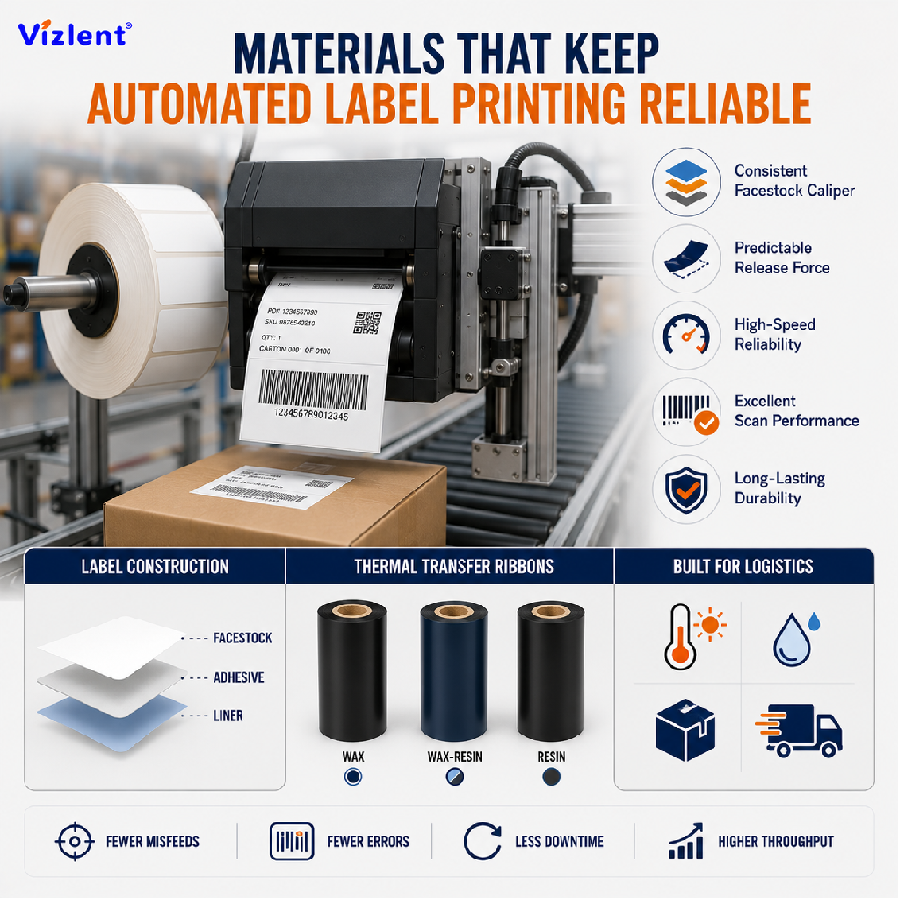
The label material itself is just as important as the hardware when it comes to how automated label printing works in logistics, since even a well-tuned applicator will fail if the facestock or adhesive is not matched to the application. High-speed automated labeling machines need a facestock with consistent caliper and a liner with predictable release force, since variation in either one causes misfeeds or double-dispense errors on the line. Selecting the correct thermal transfer ribbon formulation, including wax, wax-resin, or full resin, also directly affects barcode scan grade and how long automated labels remain legible in transit.
Facilities running high volumes of logistics and ecommerce parcels should specify adhesive chemistry based on the actual box surface, since a permanent acrylic adhesive that performs well on corrugated kraft will not bond adequately to a low-surface-energy polybag. Choosing between inkjet printing label stock and laser printing label stock also matters for facilities that print labels in-house before applying them, since each print method requires a differently coated facestock surface. Matching material to hardware and application surface is what ultimately determines if an automated labeling system performs reliably at full production volume.
Sourcing Logistic Labels: Box Quantities, Online Ordering, and Bulk Orders
A logistic label box purchased for a small operation typically covers a few thousand labels, sized for facilities testing a new print-and-apply setup or running lower parcel volumes. Placing a logistic label order online has become the standard purchasing method for most fulfillment operations, since suppliers can quote roll dimensions, adhesive grade, and facestock material directly through a web inquiry form or sales portal. Larger operations typically move beyond single-box purchases toward standing purchase agreements that lock in pricing and lead times across multiple shipments.
Ordering a logistic label box for evaluation purposes before committing to a large production run is a practical way to confirm that a specific material performs correctly on existing hardware. A logistic label order placed in bulk quantities generally reduces per-unit cost significantly compared with small box orders, making it worthwhile for any facility with predictable, ongoing label consumption. Reviewing supplier lead times before placing a logistic label order matters as much as price, since a stockout on shipping labels can halt an entire fulfillment line.
Placing a logistic label online request has become the fastest way for procurement teams to get an accurate quote, since most suppliers can review facestock, adhesive, and roll dimension requirements directly from a submitted form without a phone call. A logistic label online inquiry should always include the applicator model, expected volume, and package surface type, since these details determine which material recommendation a supplier can responsibly make. Skipping these details in an online request usually leads to a follow-up round of questions that slows down the quoting process unnecessarily.
How VIZLENT Supports Automated Label Printing in Logistics
VIZLENT Label manufactures the self adhesive label stock, thermal transfer ribbons, and lamination films that keep automated label printing running reliably across high-volume fulfillment operations. Facilities specifying auto label printing materials can source facestock calibrated for direct thermal or thermal transfer print engines, paired with adhesive grades matched to corrugated, polybag, or rigid tote surfaces. This combination reduces the misfeed, delamination, and scan failure issues that commonly disrupt automated labeling machines running at full line speed.
Businesses building or scaling a logistic label business can request free sample rolls to test peel strength, release force, and barcode scan grade on their actual print-and-apply hardware before committing to a bulk production order. VIZLENT’s engineering team works directly with procurement teams to match facestock calipers, liner type, and ribbon formulation to the specific applicator and conveyor speed in use. Contact our team to review label material options for your automated labeling system, or visit our blog for more guidance on print-and-apply material selection.
Conclusion: How Automated Label Printing Works in Logistics
How automated label printing works in logistics ultimately depends on three things working together: hardware that matches the required line speed, label material that performs reliably on the target packaging surface, and an inspection step that catches errors before they become carrier exceptions. Facilities that treat material selection with the same rigor as hardware selection consistently see fewer misfeeds, rejections, and delivery delays. Understanding how automated label printing works in logistics is the foundation for any operations team planning to scale a fulfillment line.
VIZLENT Label supports fulfillment operations of every size with label stock, thermal transfer ribbons, and lamination films engineered specifically for high-speed automated labeling machines. Teams that fully understand how automated label printing works in logistics, from print engine through inspection, are best positioned to specify the right hardware and material combination the first time. Contact our team to discuss the right material specification for your automated label printing line, or visit our blog for more logistics labeling guidance.
Frequently Asked Questions
How automated label printing works in logistics, in simple terms?
How automated label printing works in logistics comes down to a print engine generating the barcode, an applicator placing the label on the parcel, and a scanner verifying the result, all completed in a fraction of a second per package. This sequence is coordinated by a control system synchronized to the conveyor line speed. The result is consistent, high-volume labeling without a manual operator at each station.
What is the difference between an automatic label printer and a standard office printer?
An automatic label printer is built for continuous, high-speed operation and typically integrates directly with an applicator mechanism, while a standard office printer requires a person to manually place each label. Industrial automatic label printer units also use direct thermal or thermal transfer technology optimized for barcode contrast rather than general document printing. This difference is why fulfillment centers invest in dedicated print-and-apply hardware rather than desktop printers.
How often should an automatic label dispenser be serviced?
Most facilities service the automatic label dispenser and peel bar assembly on a scheduled maintenance interval, often monthly or based on a specific label count threshold recommended by the hardware manufacturer. Buildup of adhesive residue on the peel bar is a common cause of misfeeds if left unaddressed. Following the manufacturer’s service schedule prevents the gradual degradation that leads to line stoppages.
Do automated labeling systems work with all box and packaging types?
Not universally; automated labeling systems need to be configured for the specific range of box sizes, materials, and surface textures a facility handles. A tamp applicator suited to flat corrugated boxes may not work well on soft polybags, which often require a different applicator style. Facilities handling varied packaging types typically specify multiple applicator configurations across different lines.
What causes automated label inspection to reject a high number of labels?
Common causes include incorrect print darkness settings, a mismatched ribbon and facestock combination, or a printhead nearing the end of its service life. Automated label inspection systems flag any of these issues as a barcode grade failure, even if the label appears visually acceptable to the naked eye. Reviewing rejection logs regularly helps identify if the fault lies with hardware, settings, or label material.
Can a small logistic label business start with manual labeling before automating?
Yes, many businesses begin with manual labeling and transition to automated labeling machines once volume justifies the investment. A logistic label business processing a few hundred parcels a day may not see a return on automation as quickly as one processing thousands. Reviewing current and projected volume is the most reliable way to decide when to make the transition.
Is it better to order a logistic label box for testing before placing a large logistic label order?
Yes, ordering a smaller logistic label box first allows a facility to confirm print quality, adhesive performance, and applicator compatibility before committing to a large logistic label order. This testing step is inexpensive compared with discovering a material mismatch after a bulk shipment has already arrived. Most reputable suppliers support this kind of trial order without requiring a large upfront commitment.