Automated label printing is the use of networked printers, barcode scanners, and warehouse management software to generate, print, and apply shipping labels without manual data entry. In a logistics warehouse, an order management system sends shipment data straight to a print engine, which formats the label, prints it on demand, and either dispenses it for a worker to apply or feeds it into a robotic print-and-apply arm.
This removes keying errors, keeps label content matched to the exact order line, and lets warehouses ship higher volumes without adding proportional labor. For teams evaluating a first system or replacing an aging label printer fleet, the mechanics below outline each stage of the process from data capture to final label placement on the carton.
What Automated Label Printing Means in a Warehouse Environment
Automated label printing refers to any system where a printer produces shipping, barcode, or compliance labels directly from digital order data, without a person typing product codes or addresses by hand. The printer sits inside the warehouse network, connected to a warehouse management system or enterprise resource planning platform, so it pulls the correct fields the moment an order reaches a print trigger. Common triggers include a completed pick, a finished pack station scan, or a carrier manifest confirmation.
The output ranges from a simple desktop thermal printer producing one label at a time to a full print-and-apply tunnel that prints, peels, and presses labels onto boxes moving along a conveyor. Smaller operations often start with a single networked printer at a pack station, while high-volume distribution centers run multiple print engines tied into a central label server. Either setup depends on the same foundation, meaning accurate order data, a print template, and label stock that holds up through transit.
- Desktop and industrial thermal printers for pack stations
- Print-and-apply tunnels for conveyor-fed cartons
- Handheld mobile printers for floor-level labeling
- Centralized print servers managing templates across multiple stations
How Automated Label Printing Works in Logistics Warehouse Shipping
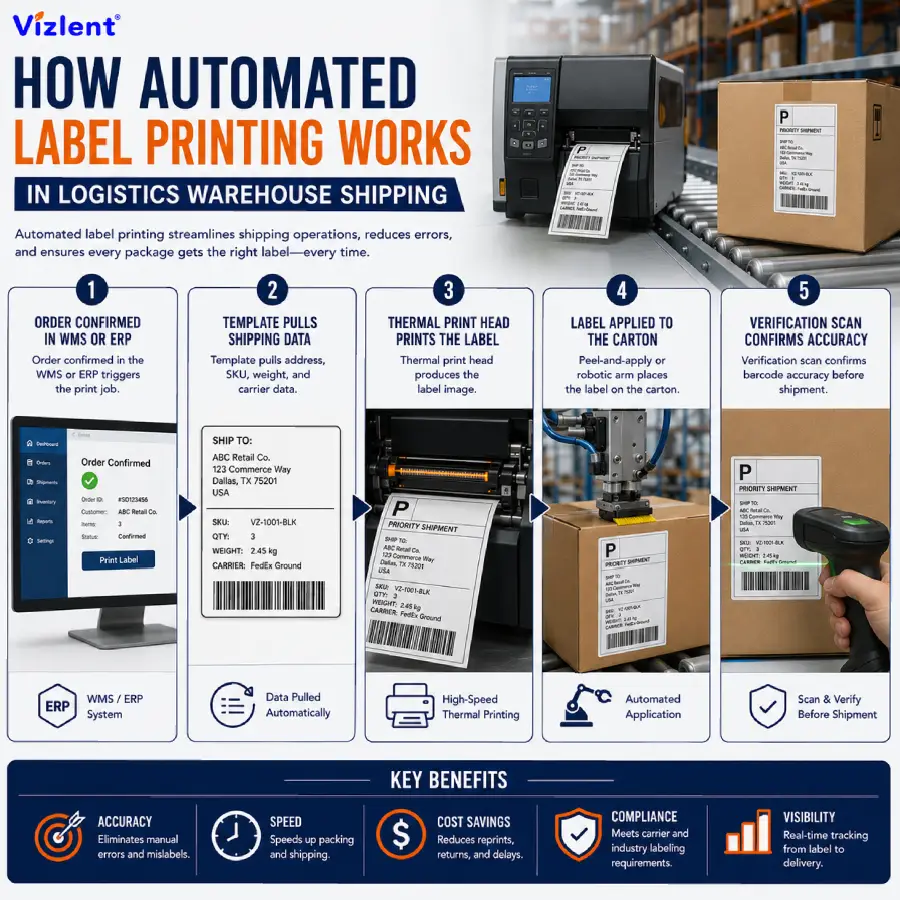
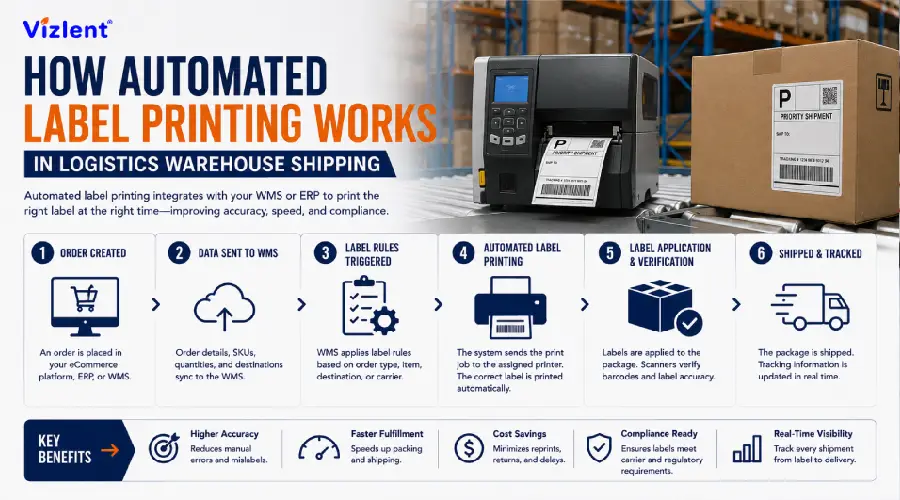
The process starts when an order is confirmed in the warehouse management system, which pulls customer address, carrier account, weight, and SKU data into a label template stored on the print server. That template maps each data field to a fixed position on the label, so the barcode, ship-to address, and carrier tracking number print in the same place every time. Once the template is populated, the print command is sent to the assigned printer over the network, usually within a second of the trigger event.
At the physical printer, a thermal print head burns the image onto the label facestock, either through direct thermal printing or thermal transfer printing using a thermal transfer ribbon. The finished label is peeled from its liner automatically or fed to an applicator arm that presses it onto the carton at a set position and pressure. A verification scanner then reads the freshly printed barcode to confirm it matches the order before the carton continues down the line.
- Order confirmed in the WMS or ERP triggers the print job
- Template pulls address, SKU, weight, and carrier data
- Thermal print head produces the label image
- Peel-and-apply or robotic arm places the label on the carton
- Verification scan confirms barcode accuracy before shipment
Types of Label Printing Systems Used in Modern Warehouses
There are several types of label printing systems used across logistics operations, and the right choice depends on print volume, label durability needs, and floor layout. Direct thermal printers use heat-sensitive facestock and need no ribbon, making them suited to short-term labels like standard parcel shipping labels. Thermal transfer printers use a ribbon to melt wax or resin onto the label, producing a more durable print that resists heat, moisture, and abrasion during transit.
Inkjet label printers remain common for color labels, retail branding, or compliance markings that need more than black text, while laser label printers handle sheet-fed batch runs in office-adjacent shipping areas. Print-and-apply systems combine any of these print engines with a robotic or pneumatic applicator, removing the manual placement step entirely. Choosing between these types of label printing comes down to matching the print method to the label’s expected shelf life and handling environment.
- Direct thermal: Short-term labels, no ribbon required
- Thermal transfer: Ribbon-based, higher durability
- Inkjet: Color and branding labels (see inkjet printing labels)
- Laser: Sheet-fed batch printing
- Print-and-apply: Automated placement on cartons
How Automated Print and Apply Systems Operate
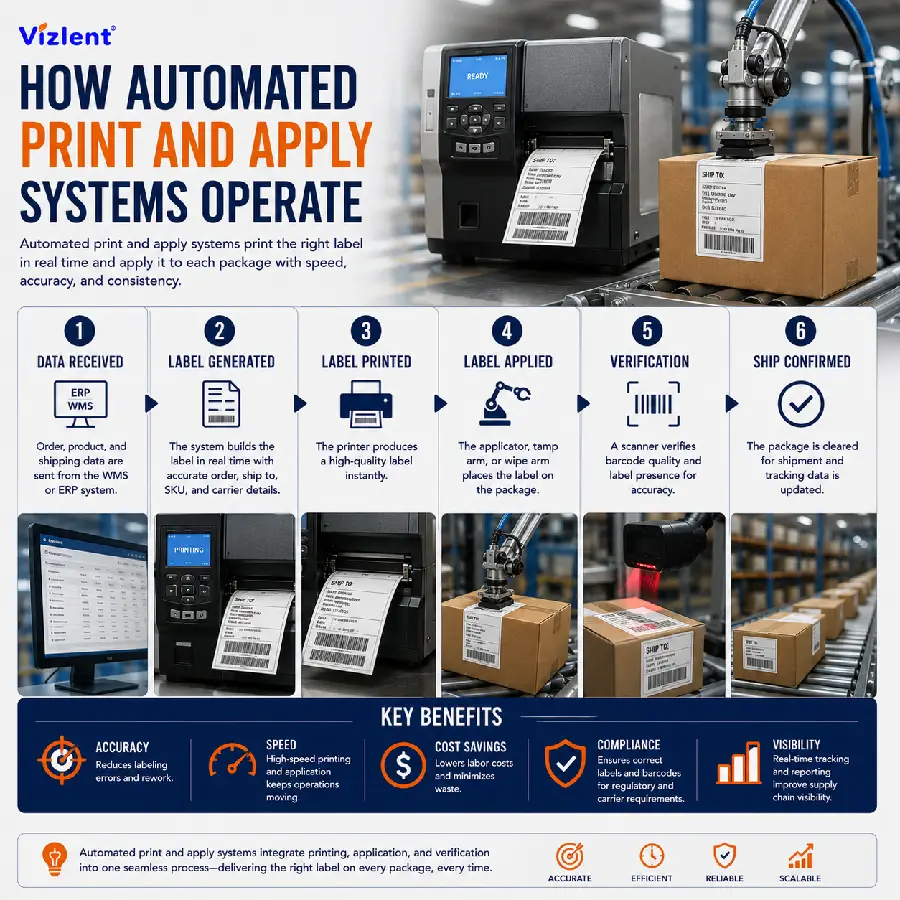
Automated print and apply systems combine a label printer with a mechanical applicator so the label prints and attaches to the carton without a person handling it. As a box passes a photo-eye sensor on the conveyor, the system triggers the printer, produces the label, and positions it on a pad or tamp arm within a fraction of a second. The applicator then presses or blows the label onto the carton surface at the programmed location, typically the top or side panel.
These systems run at line speeds far above manual labeling, often handling several dozen cartons per minute without slowing the conveyor. Because placement is mechanical rather than manual, print and apply units also produce more consistent label positioning, which matters for automated scanning further down the supply chain. Maintenance mainly involves keeping the print head clean, replacing the ribbon on schedule, and confirming sensor alignment stays accurate over time.
- Photo-eye sensor triggers the print cycle
- Tamp or blow-on applicator presses the label onto the carton
- Line speeds support several dozen cartons per minute
- Consistent placement improves downstream barcode scanning
Barcode and QR Code Printing for Shipping Accuracy
Automated label printing barcode systems generate a unique, scannable code for every carton, and that code is what carriers, sortation equipment, and receiving docks rely on to track the shipment. Most warehouses print linear barcodes such as Code 128 for carrier tracking numbers, alongside a 2D barcode or QR code for internal SKU and lot tracking. The printer pulls this data straight from the order record, so the barcode always matches the physical contents of the box.
Automated label printing QR code use has grown as warehouses add mobile scanning apps that read QR codes faster on handheld devices than older linear formats. Print quality matters here, since a smudged or low-contrast barcode can fail a scan and delay the shipment at a carrier hub. Regular calibration of the print head, paired with the right ribbon and facestock combination, keeps barcode grade consistent across every print run.
- Code 128 linear barcodes for carrier tracking
- 2D barcodes and QR codes for SKU and lot data
- Print head calibration to maintain scan-grade quality
- Verification scanning before the carton leaves the station
Connecting Label Printers to WMS and ERP Platforms
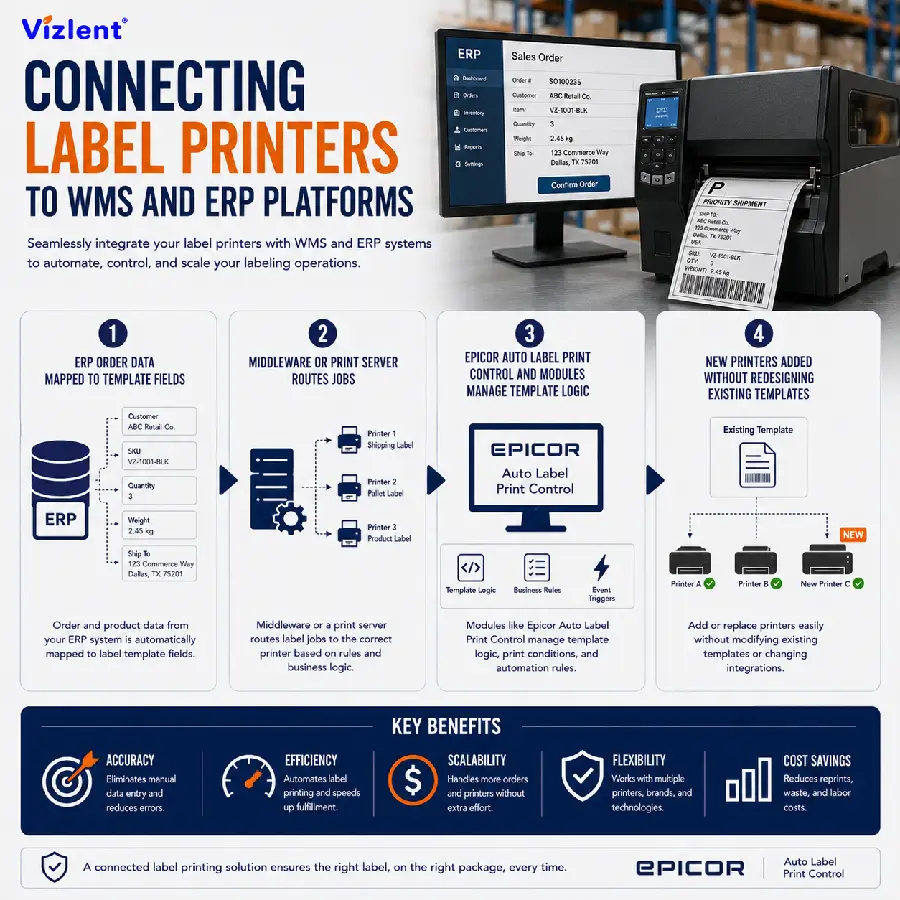
Automated label printers only work as fast as the software feeding them data, so integration with the WMS and ERP platform is a core part of any setup. Platforms such as Epicor auto label print control modules let warehouses map order fields directly to label templates, so a change in the ERP order record updates the next printed label automatically. This removes the need for a separate label design step every time a product or shipping requirement changes.
Most integrations use a print server or middleware layer that sits between the ERP and the physical printers, translating order data into the label format each printer brand expects. This layer also manages which printer receives which job, based on the pack station or dock door where the order is being processed. A well configured integration means a warehouse can add new printers or ship-to requirements without rewriting the underlying label template.
- ERP order data mapped to label template fields
- Middleware or print server routes jobs to the correct printer
- Epicor auto label print control and similar modules manage template logic
- New printers added without redesigning existing templates
Selecting Blank Label Stock and Print Rollers for High-Speed Printers
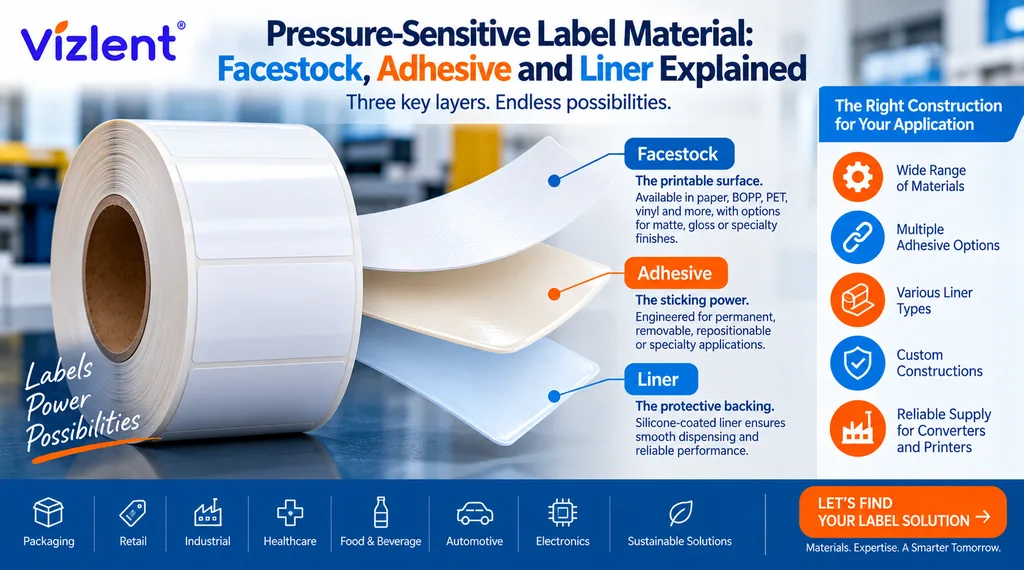
Automated label printing blank stock, meaning unprinted label rolls ready to load into a printer, comes in several facestock options including paper, polyester, and vinyl, each suited to different shipping conditions. Standard direct thermal paper works for domestic parcel labels with a short transit window, while polyester or synthetic facestocks hold up better on cold-chain shipments or outdoor last-mile deliveries. Matching the blank stock to the shipping environment prevents faded or peeling labels before the package reaches its destination.
Automated label printing roller components, including the platen roller and ribbon rollers inside the print head assembly, need regular inspection since worn rollers cause skewed prints, ribbon wrinkling, or inconsistent label feed. Warehouses running high print volumes typically replace platen rollers on a set maintenance schedule rather than waiting for a visible print defect. Pairing the right blank label stock with well maintained rollers keeps barcode quality consistent across thousands of daily prints.
- Paper facestock for standard domestic parcel labels
- Polyester or vinyl facestock for cold-chain and outdoor conditions
- Platen and ribbon rollers inspected on a maintenance schedule
- Facestock matched to expected transit and storage conditions
Bulk Label Printing for High-Volume Fulfillment
Automated label printing bulk runs are standard in distribution centers processing thousands of orders per shift, where a single print server manages jobs across multiple stations simultaneously. Rather than printing one label at a time from a workstation, bulk print jobs queue labels in batches tied to a wave of orders, a truck route, or a carrier pickup window. This batching reduces printer idle time and keeps pack stations supplied with labels as fast as workers can apply them.
Running bulk print volumes reliably depends on label stock supply planning as much as printer speed, since a station that runs out of blank rolls mid shift stalls the entire line. Many warehouses hold buffer stock of label rolls and ribbon cartridges sized to at least one full shift of expected volume. Sourcing consistent, in-spec logistics and e-commerce label materials in bulk from a manufacturer that can supply container-load quantities helps prevent these mid-shift shortages.
- Batch print jobs tied to order waves or carrier windows
- Buffer stock of label rolls and ribbon sized to shift volume
- Reduced printer idle time across multiple stations
- Bulk sourcing from a manufacturer to avoid shortages
Label Design Standards for Automated Shipping Labels
Automated label printing design starts with the fixed data a carrier requires, including the ship-to address, tracking barcode, weight, and service level, positioned according to that carrier’s layout specification. Most parcel carriers publish exact placement and size rules for these elements, and templates built outside those specs risk rejection at the carrier’s automated sortation hub. Warehouses shipping through multiple carriers typically keep a separate template per carrier to avoid formatting conflicts.
Beyond the mandatory carrier fields, label design also covers internal fields such as SKU, lot number, or hazard markings needed for compliance on regulated goods. Font size and barcode density need enough contrast and white space for a scanner to read reliably at conveyor speed, since overly dense layouts increase scan failure rates. Testing a new label design against the actual printer and stock combination before full rollout catches spacing or contrast issues early.
- Carrier-specific layout rules for address and tracking barcode
- Separate templates maintained per carrier
- Internal fields for SKU, lot, and hazard markings (see security labels for tamper-evident and serialized options)
- Font size and barcode density tested for scan reliability
Sourcing Automated Label Printing Equipment and Materials
Searches for automated label printing near me, label printing companies near me, or printing labels services near me usually point to warehouses looking for local installation and repair support for their printer hardware. Local providers can be useful for same-day printer service calls, but the label stock and ribbon these printers consume is often sourced separately from a manufacturer rather than a local repair shop. Many warehouses split these two needs, keeping a local technician for hardware while sourcing consumables from a factory-direct supplier.
Automated label printing in China has grown as a sourcing option because several manufacturers there produce both the facestock materials and thermal transfer ribbons used across print-and-apply systems, often at container-load volumes with shorter lead times than smaller regional converters. A brand label printing near me search can also lead a business toward a supplier able to private-label or custom-slit rolls to a specific printer’s spec, rather than settling for a generic off-the-shelf size. Buyers comparing labeling printing near me options should confirm any supplier can provide test samples before committing to a bulk order.
- Local technicians for printer hardware installation and repair
- Factory-direct sourcing for label stock and ribbon consumables
- Custom-slit rolls matched to a specific printer’s spec
- Sample testing before bulk commitment, request one through our contact page
Building an Automated Label Printing Business or Program
Starting an automated label printing business, or simply building out an internal automated label printing program for an existing warehouse, both start with the same core decision, matching print volume to hardware capacity before committing to equipment. Underestimating daily print volume leads to bottlenecks at pack stations, while oversizing the hardware budget ties up capital that could go toward label stock or staff training instead. A short pilot run at one station, measuring actual prints per hour, gives a more reliable number than vendor estimates alone.
Automated label printing for business operations also depends on a dependable supply chain for label stock, ribbon, and printer parts, since a stockout at any point in that chain stops the print line completely. Businesses scaling from a single printer to a multi-station operation typically formalize a reorder schedule and keep a secondary supplier on file in case lead times slip. Treating label materials with the same supply planning rigor as packaging or shipping cartons avoids most of the disruptions that catch growing operations off guard.
- Pilot run to measure real prints-per-hour before scaling
- Reorder schedule for label stock, ribbon, and printer parts
- Secondary supplier on file for lead time protection
- Supply planning treated with the same rigor as packaging materials
Why This Matters for Warehouse Shipping Accuracy and Cost
Warehouses that understand how automated label printing works in logistics warehouse shipping typically see fewer mislabeled cartons, faster pack station throughput, and fewer carrier rejections at the sortation hub. Manual labeling introduces typing errors and inconsistent barcode placement that automated systems remove by design, since every label pulls from the same verified order data. Over a full shipping season, this consistency compounds into fewer return processing delays and lower customer service costs tied to wrong-address or wrong-item shipments.
The return on an automated label printing system comes from three combined savings, meaning reduced labor per carton, fewer reprints from scan failures, and lower claims from carrier mislabeling penalties. Warehouses running high order volume typically recover the cost of a print-and-apply system within the first year of steady operation. Pairing the right printer hardware with dependable label stock and ribbon keeps that return consistent as order volume grows.
- Fewer mislabeled cartons and carrier rejections
- Lower labor cost per carton shipped
- Faster payback period as order volume scales
Ready to Source Reliable Label Materials for Automated Printing?
Vizlent supplies direct thermal paper, polyester facestock, and thermal transfer ribbon built for high-speed print-and-apply lines in logistics warehouses. Contact our team for a free sample, or browse our logistics and e-commerce label materials built for automated shipping label printing.
Frequently Asked Questions
What is auto label printing?
Auto label printing is the automatic generation and printing of shipping, barcode, or compliance labels straight from order data, without a worker typing information into the printer manually. The printer connects to a warehouse management system or ERP platform, pulling address, SKU, and carrier fields into a saved template at the moment an order reaches a print trigger. This cuts data entry errors and keeps the printed label matched to the exact order it represents.
Are automated labels the same thing as automated labels?
Automated labels is a common misspelling of automated labels, and both terms point to the same technology, meaning printers that generate and apply shipping labels directly from digital order data without manual entry. Search engines generally treat the misspelling and the correct spelling as referring to the same intent. Whichever spelling is used, the underlying system works the same way, pulling order data into a template and printing on demand.
What types of label printing work best for shipping labels?
Direct thermal and thermal transfer are the two most common types of label printing used for shipping labels, chosen based on how long the label needs to stay legible during transit. Direct thermal suits short domestic shipments since it needs no ribbon, while thermal transfer holds up better against heat, moisture, and handling on longer routes. The right choice depends on expected transit time and the storage conditions the carton will pass through.
How does automated print and apply differ from manual labeling?
Automated print and apply systems print and press the label onto the carton mechanically as it moves along a conveyor, removing the manual step of a worker peeling and sticking each label by hand. This allows line speeds of several dozen cartons per minute with consistent label placement every time. Manual labeling can still work for lower volume operations, but it introduces more placement variation and slower throughput as order counts grow.
Can automated label printing barcode systems handle both linear barcodes and QR codes?
Yes, most modern automated label printing barcode systems can print linear barcodes such as Code 128 alongside 2D QR codes on the same label, since both formats pull from the same order data. Carriers typically require the linear barcode for tracking, while QR codes are often added for internal SKU or lot verification. Printing both formats on one label lets a single scan pass serve external and internal tracking needs at once.
Does Epicor auto label print control work with third-party printers?
Epicor auto label print control and similar ERP-integrated modules are generally built to work with a range of third-party thermal printers through standard printer languages such as ZPL or EPL. Compatibility should still be confirmed against the specific printer model and firmware version before deployment, since not every printer supports every command set. Most warehouses test one printer model end to end before rolling the integration out across additional stations.
Where can a warehouse source automated label printing near me for both hardware and materials?
Warehouses searching for automated label printing near me, label printing companies near me, or printing labels services near me are usually looking for local technicians to handle hardware installation and repair. Label stock, ribbon, and blank rolls are more commonly sourced in bulk from a manufacturer rather than a local shop, since consistent facestock quality matters more than proximity for consumables. Requesting a free sample before committing to a bulk order is the most reliable way to confirm a supplier fits a specific printer setup.
Is automated label printing worth it for a small warehouse or a growing business?
Automated label printing for business operations can be worth it even at a modest order volume, since the labor savings and reduction in mislabeling errors often offset the initial hardware cost within a year. Growing operations benefit further because the same print server and template setup scales to additional stations without a full redesign. A short pilot at one pack station is usually enough to confirm the volume and payback math before a larger rollout.