
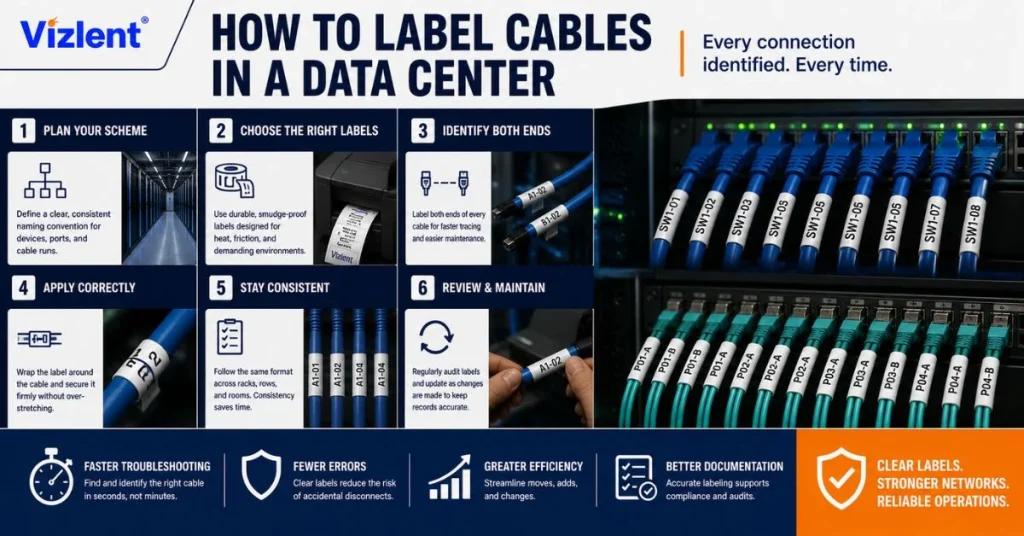
To label cables in a data center, build a naming convention from the room grid down to the port, print machine-generated identifiers on both ends of every cable, choose a wrap, flag, or sleeve format matched to the cable diameter, and use materials rated for hot-aisle temperatures and handling. The TIA-606 administration standard supplies the identifier framework, and a record system keeps every label tied to documentation. Done this way, any technician can trace any cable in seconds without pulling it.
Data centers contain thousands of similar cables running through racks, trays, and pathways. Without a structured labeling system, troubleshooting, upgrades, audits, and maintenance become slower and more prone to errors. Clear and durable cable labels turn complex cabling infrastructure into an organized, manageable network.
Why Cable Labeling Decides Data Center Uptime
Almost every physical task in a data center starts with finding the right cable. Moves, adds, and changes, the daily churn of patching, all depend on it, and so does every incident response that involves a port, a link, or a power feed. An unlabeled environment turns each task into a trace, and a trace through dense bundles takes minutes that an outage clock counts in revenue.
The worst failure mode is the confident mistake. A technician who pulls the wrong cable from an unlabeled bundle does not just lose time; they take down a service nobody scheduled for downtime, and the post-incident review writes itself. Labels convert tribal knowledge into infrastructure, which is exactly what a facility full of contractors and rotating staff needs.
1. Build the Naming Convention Before the First Label
The naming convention is the system, and it gets designed once, before anything prints. The proven approach builds each identifier from the facility’s own geography: the room or grid coordinate locates the rack, the rack unit locates the panel, and the port number finishes the address. A cable identifier then names its two endpoints, so the label itself says where the other end lives.
- Rack location: a floor-grid coordinate such as AJ05, readable straight off the room layout.
- Rack unit and panel: the RU position of the patch panel or switch inside that rack.
- Port: the specific position on that panel, completing the address.
- Cable format: near end to far end, for example, AJ05-40:12 / AK11-38:03, so either end reveals both.
Resist the urge to encode meaning that changes. Identifiers built on locations stay true for the life of the cable, while identifiers built on server names, applications, or owners go stale with the first migration. Location is permanent. Everything else belongs in the database that the identifier points to.
2. Label Both Ends, Every Time
One label per cable is half a system. A cable labeled only at the patch panel is anonymous at the switch, which is precisely where someone will be standing when it matters, so every cable carries its identifier at both ends, placed a consistent short distance behind each connector. Consistency of position matters almost as much as the label itself, because hands learn where to look.
Long runs deserve midpoint labels, too. A cable crossing a pathway, passing through a wall, or running under a raised floor should repeat its identity wherever a technician might encounter it without either end in view. The rule generalizes cleanly: label every point where a human decides the cable.
3. Choose the Label Format for the Cable
Cable labels come in a handful of physical formats, and diameter picks between them. The workhorse is the self-laminating wrap: a label with a printed white zone and a long, clear tail that wraps over the print, sealing it under a transparent layer that shrugs off handling, abrasion, and cleaning. It suits copper patch cords and most fiber jumpers.
- Self-laminating wraps: printed zone plus clear over-wrap, the default for patch cords and horizontal cabling.
- Flag labels: stick out like a small tab, readable on thin fiber where a wrap would be illegible, at the cost of width in dense bundles.
- Heat-shrink sleeves: slid on before termination and shrunk in place, the permanent choice for backbone and infrastructure runs.
- Panel and port labels: flat labels on patch panels, faceplates, and switch ports that anchor the whole identifier system.
Pick one format per cable class and standardize it. A room where every patch cord wears the same wrap in the same position reads like a document, while a mix of formats reads like a history of whoever installed what. Uniformity is a feature technicians can feel.
4. Materials That Survive the Hot Aisle
A data center is gentler than a refinery but harder on labels than an office. Hot aisle exhaust runs warm around the clock, cables flex and rub during every change, and the PVC and LSZH jackets themselves are surfaces that ordinary office labels release from within months. Quality cable labels use polyester or vinyl facestocks with adhesives matched to cable jacket materials, so the bond outlasts the equipment refresh cycle.
Two specialty requirements appear around the racks. Labels applied near wiring, power distribution, and electrical panels often need flame-retardant constructions rated UL 94 V-0 in halogen-free builds, and labels on or near ESD-sensitive electronics call for anti-static label stock that dissipates charge instead of storing it. Both exist as standard materials, so neither should ever be improvised.
Specifying labels for a build or refresh? Ask Vizlent for cable label material samples and test them on your actual jacket types first.
5. Print With Thermal Transfer, Not a Pen
TIA-606 expects machine-generated labels for a blunt reason: handwriting fails at scale, fading, smearing, and varying with every hand that writes it. The standard method is thermal transfer printing, where a heated head fuses ink from a ribbon into the label’s topcoat, and pairing the label stock with a resin ribbon produces print that survives abrasion, cleaning agents, and years of handling.
The label and the ribbon are one system, not two purchases. A thermal transfer ribbon mismatched to the facestock smudges under a thumb on day one, which no naming convention can fix. Specify the facestock, topcoat, and ribbon grade together, and print a test batch before committing a facility’s worth of labels.
6. Color Coding Without Creating Chaos
Color is a second information channel, and data centers already use it instinctively: redundant A and B power feeds in two colors, fiber jacket colors signaling type, patch cord colors split by service or security zone. Used with discipline, color lets a technician confirm a cable class from across the aisle before reading a single character. Used casually, it decays into folklore within a year.
Discipline means a written scheme. Document what every color means, keep the palette small enough to remember, and never let color replace the printed identifier, since color blindness, dim aisles, and vendor stock changes all defeat it. Color narrows the search. The label answers it.
7. Barcodes, QR Codes, and the Record System
Identifiers earn their keep when they connect to records, and machine-readable codes make that connection instant. Adding a barcode or QR code beside the human-readable text lets technicians scan a cable into audits, trouble tickets, and DCIM or cable management databases without typing, which removes the transcription errors that quietly corrupt documentation. The printed text stays primary, and the code accelerates it.
At the asset scale, the same logic extends to RFID, where a tagged cable or asset reads without line of sight during sweeps. Most facilities do not start there. Start with the codes the existing label printer already produces, prove the audit workflow, and let the record system, not the technology, be the thing the team trusts.
The Workflow: Label at Install, Update at Change
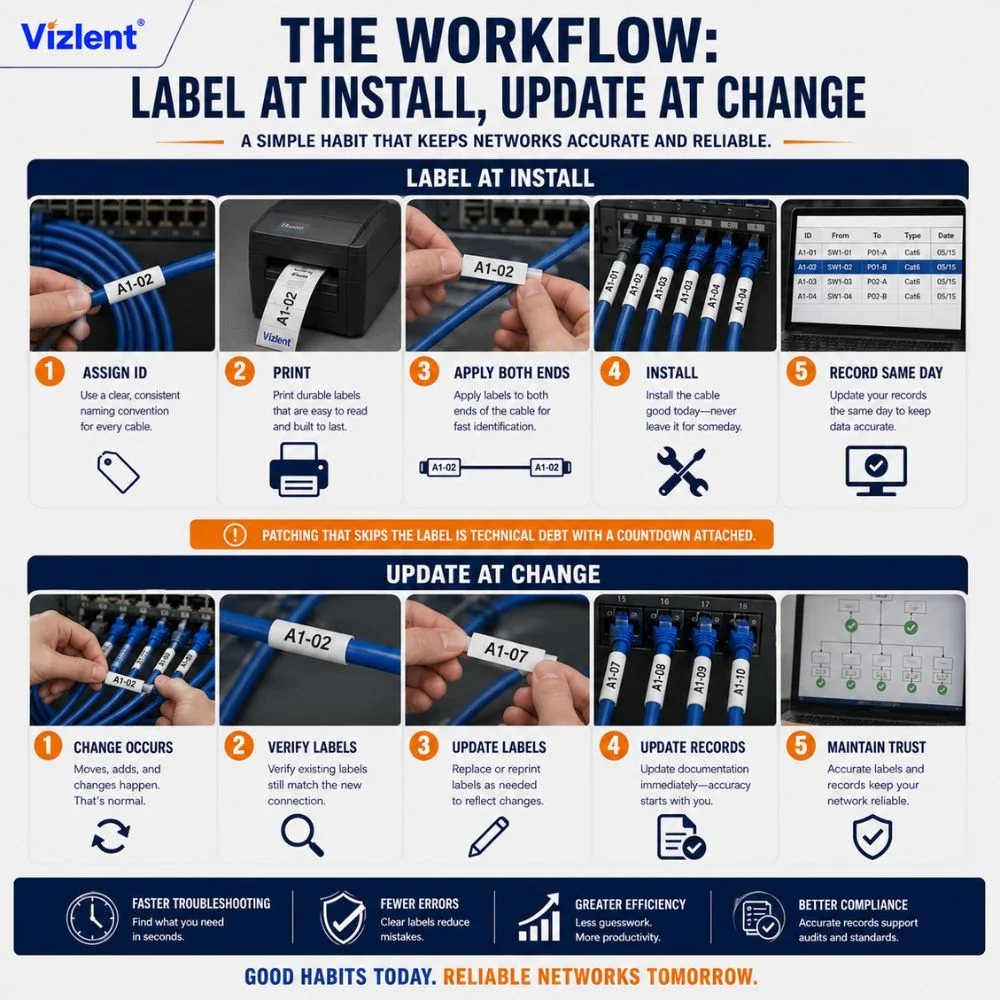
Labeling is a workflow habit, not a project. Every new cable gets its identifier assigned from the convention, printed, and applied to both ends before or during installation, never on a someday list, and the record system gets the entry the same day. Patching that, which skips the label, is technical debt with a countdown attached.
Changes are where systems rot, so build the discipline there. A moved cable gets relabeled to its new endpoints, a decommissioned cable gets pulled rather than abandoned in the pathway, and the records change in step. The room and the database telling the same story is the entire definition of administration.
Rescuing an Unlabeled Room
Brownfield reality is bundles of identical cables and no labels at all, and the rescue is methodical rather than heroic. Define the naming convention first, then work rack by rack, tracing or toning each cable, labeling both ends as it is confirmed, and entering it in the records before moving on. Partial certainty is worthless here, so a cable is either verified and labeled or still in the queue.
Sequence the work by risk and value. Start with the racks that change most often, since that is where unlabeled cable costs the most time, and fold the remaining areas into scheduled maintenance windows. A room rescued this way stays rescued, because the convention and the workflow arrive together.
Planning a relabeling project? Get bulk cable label stock matched to your printer from Vizlent before the first maintenance window.
Sourcing Cable Label Materials in Bulk
A facility-scale program consumes labels by the thousands, which moves the buying decision upstream. Teams printing in-house buy blank self-laminating and flag stock in rolls matched to their thermal transfer printers, while integrators and converters serving multiple sites buy label stock in slit or jumbo rolls and convert to their own formats. Either way, the material specification, facestock, adhesive, topcoat, and ribbon decide everything downstream.
Vizlent manufactures the underlying materials at its Shenzhen facility, coating polyester and vinyl facestocks with adhesives matched to cable jackets, including flame-retardant and anti-static constructions, slit from 30 mm to 1300 mm widths within the wider appliances and industrial range. Custom orders run 7 to 15 days with free samples first, so the label, ribbon, and jacket combination is proven before a full program commits.
Label Your Data Center Cables Once, Correctly
How to label cables in a data center reduces to a short list applied without exception: a location-based naming convention, machine-printed identifiers on both ends, one standardized format per cable class, materials rated for the aisle, and records that change whenever the cables do. None of it is exotic. All of it is discipline, and the payoff arrives with every trace that takes seconds instead of minutes.
Vizlent Label Materials Co supplies the material half of that discipline: polyester and vinyl cable label stock with jacket-matched adhesives, flame-retardant and anti-static options, and thermal transfer ribbons specified as one system, manufactured under ISO 9001, FSC, and SGS certification since 2011. Free samples ship before any bulk order, and custom slitting matches the stock to your printer and format. Reach out today and put identifiers on your cables that outlast the hardware they connect to.
Contact Vizlent for a quote and free samples, and source cable label materials built for the data hall.
Frequently Asked Questions
What standard covers data center cable labeling?
ANSI/TIA-606, the administration standard for telecommunications infrastructure, defines the identifier system for cables, ports, racks, and pathways, and TIA-942, the data center standard, references it for administration. Its core expectations are unique location-based identifiers, machine-generated labels, and records that stay synchronized with the physical plant.
Should cables be labeled on both ends?
Yes, always. Each end carries the cable’s identifier a consistent short distance behind the connector, and the identifier itself names both endpoints, so reading either end reveals where the other lives. Long runs add midpoint labels wherever the cable crosses pathways, walls, or floors out of sight of its ends.
What is a self-laminating cable label?
A self-laminating label has a printed white zone and a long, clear tail that wraps over the print, sealing the text under a transparent protective layer. The over-wrap protects the identifier from abrasion, handling, and cleaning, which makes it the default format for copper patch cords and most fiber jumpers.
What label format works best for thin fiber cables?
Flag labels work best on small-diameter fiber. The label folds around the cable and sticks to itself, leaving a flat tab that carries the identifier at full readable size, where a wrapped label would be too small to print legibly. The trade-off is width, so dense bundles need tidy flag orientation.
Are handwritten cable labels acceptable?
No. TIA-606 expects printed, machine-generated labels because handwriting fades, smears, and varies with every writer, and legibility at scale is the entire purpose of the system. Thermal transfer printing with a resin ribbon on polyester or vinyl stock is the standard method for durable, consistent identifiers.
What should cable label identifiers be based on?
Base identifiers on permanent locations: the room grid coordinate, the rack, the rack unit, and the port, with cable labels naming both endpoints. Avoid encoding server names, applications, or owners, since those change with every migration, while the location stays true for the cable’s whole life.
Do data center labels need special material ratings?
Often, yes. Hot aisle temperatures and cable flexing demand polyester or vinyl facestocks with adhesives matched to PVC and LSZH jackets, labels near power and wiring frequently need UL 94 V-0 flame-retardant construction, and labels on ESD-sensitive equipment call for anti-static stock that dissipates charge.
How do you label cables in an existing, unlabeled data center?
Define the naming convention first, then work rack by rack: trace or tone each cable, label both ends once verified, and enter it in the record system before moving on. Prioritize the racks that change most often, and fold the rest into scheduled maintenance windows until the room is complete.