
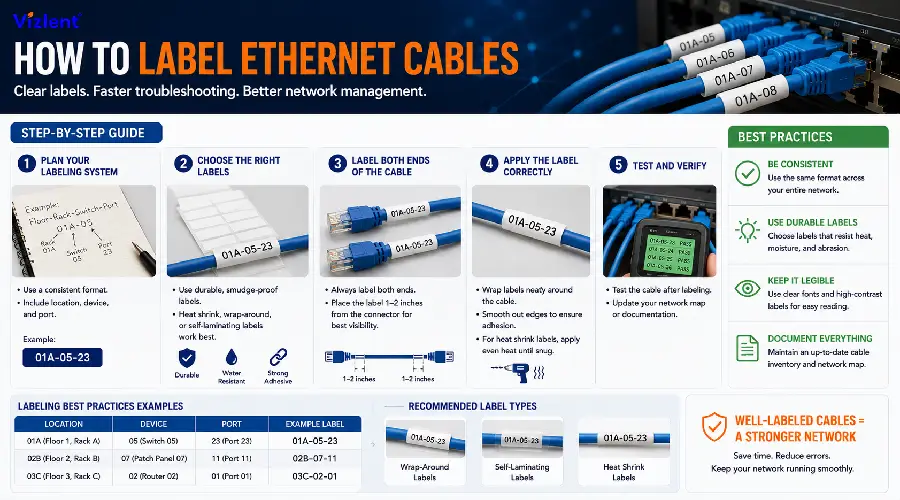
The best way to label ethernet cables professionally is to use self-laminating wrap-around labels or tags from your label maker. This means marking your cables with a durable, printed label that shows the cable ID.
Consistent labeling turns a wall of tangled cords into a system anyone on the team can read at a glance. A technician tracing a fault at 2 a.m. should not have to guess which jack feeds which port. That single habit, done correctly on day one, saves hours of troubleshooting over the life of the network.
Why Ethernet Cable Labeling Matters for Network Uptime
Unlabeled cabling is one of the most common causes of extended downtime during a network outage. When a switch port fails or a patch panel needs re-termination, technicians without labels must trace each cable by hand, often shutting down active links by accident in the process. A labeled network turns a multi hour outage into a five minute fix.
Labeling also protects the business case for the network itself. Auditors, insurers, and new IT staff all rely on clear documentation to understand what they are looking at. A cable plant with clean labels signals a mature operation, while a rat’s nest of unmarked cords signals risk to anyone who has to work on it later.
Ethernet Cable Labeling Standards You Should Follow
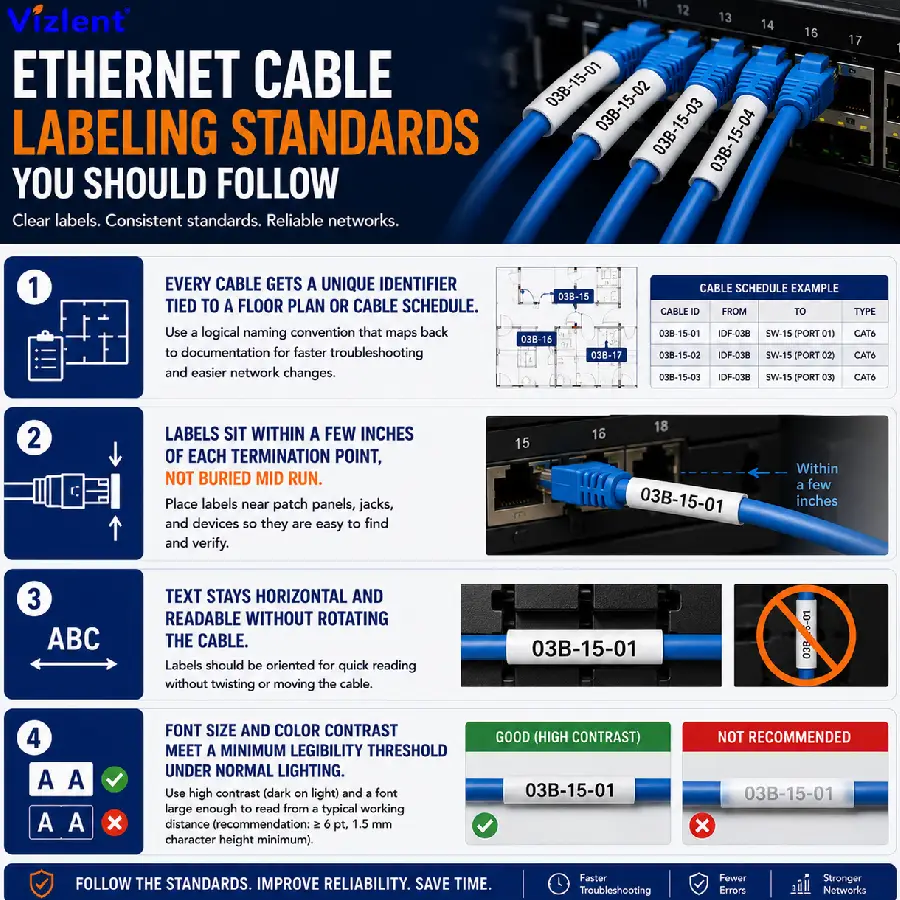
Most enterprise and data center teams follow ethernet cable labeling standards drawn from ANSI/TIA-606-B, the telecommunications administration standard published by the Telecommunications Industry Association. This standard defines how cables, racks, patch panels, and rooms should be identified so that any technician, not just the one who installed the run, can read the system. Following a published standard also keeps labeling consistent across sites managed by different contractors over time.
- Every cable gets a unique identifier tied to a floor plan or cable schedule.
- Labels sit within a few inches of each termination point, not buried mid run.
- Text stays horizontal and readable without rotating the cable.
- Font size and color contrast meet a minimum legibility threshold under normal lighting.
Smaller offices without a full TIA-606-B rollout can still borrow the core ideas. A simple naming convention such as room number, then rack number, then port number, covers most of the benefit without the full compliance overhead. What matters most is that the same convention is used everywhere, not just in the server room.
How to Label Ethernet Cables Step by Step
Knowing how to label ethernet cables starts with a naming convention decided before any cable goes into a wall or a rack. Pick a short code for the source and destination, such as a room and jack number, and write it the same way on both ends. Then choose a label format, print a test batch, and confirm the text survives a light tug and a wipe with a damp cloth before running the full job.
- Identify the source device, port, and destination for each cable run.
- Print labels in a batch rather than one at a time to keep formatting consistent.
- Apply labels a few inches from each connector before dressing the cable into a bundle.
- Photograph the finished rack for a quick visual reference in the documentation file.
- Update the cable schedule the same day the physical labels go on.
Skipping any one of these steps is how labeling projects drift out of sync with reality. A label that never made it into the spreadsheet is a label that will confuse the next technician just as much as no label at all. Treat the physical label and the digital record as one task, not two.
How to Tag Ethernet Cables for Fast Identification
Learning how to tag ethernet cables comes down to choosing a tag style that survives handling in the specific environment where the cable lives. Flag tags, wraparound tags, and heat shrink tags each hold up differently depending on how often the cable gets moved or re-routed. A cable behind a fixed wall plate needs less abrasion resistance than one that gets unplugged and re-patched every week in a lab.
The same logic applies to how to tag network cables in a shared rack shared by multiple teams. A color coded tag scheme, paired with a printed ID, lets a technician spot the right department’s cabling from across the room before reading a single character. Color alone should never replace text, since color blind team members and black and white photocopies both lose that information instantly.
How to Mark Ethernet Cables at Patch Panels and Wall Jacks
Understanding how to mark ethernet cables at each termination point prevents the single most common labeling failure, which is a label that only exists at one end of the run. Mark both the patch panel port and the wall jack with matching identifiers so a technician working from either end reaches the same conclusion about where the cable goes. This doubles the labeling work up front but removes almost all ambiguity later.
The same principle covers how to mark network cables that pass through a ceiling void, a floor box, or a conduit run. Add a mid span tag anywhere the cable disappears from view for more than a few feet, since a technician tracing a fault will often start in the middle rather than at either end. A little redundancy here costs almost nothing compared to the hours lost hunting for a single unlabeled jumper.
Best Way to Label Network Cables in a Structured Cabling System
The best way to label network cables in a structured system follows the same room, rack, and port logic used for how to label a network cable in a single office closet, just applied at scale across every floor and building. Larger sites benefit from a master cable schedule stored in a spreadsheet or a cable management platform, cross referenced against every physical label in the field. Anyone doing a site survey should be able to match a label to a spreadsheet row in seconds.
Consistency across contractors is the hardest part of a large rollout. Different installers bring different habits, so a written labeling standard, distributed before work begins, keeps everyone aligned. A short one page reference sheet posted in the server room works better than a buried policy document nobody reads twice.
Best Way to Mark Ethernet Cables for Long Term Legibility
The best way to mark ethernet cables for long term legibility is a purpose built cable label material, not a strip of tape and a permanent marker. General purpose tape yellows, curls, and loses adhesion within months, while permanent marker ink fades under UV light and handling. A proper label material, paired with a topcoat or lamination layer, keeps text sharp for years in the same conditions that destroy tape.
Environment matters as much as material choice. A closet with steady temperature and low humidity is forgiving, while a warehouse loading dock or an outdoor enclosure is not. For labels facing heat, moisture, or direct sun, Vizlent’s laminating film range adds a protective layer over the printed text so it stays legible long after ordinary labels would fade.
How to Label Ethernet Ports on Switches and Patch Panels
Knowing how to label ethernet ports on active equipment is different from labeling the cable itself, since the port label lives on the switch or panel and rarely moves once installed. Number every port left to right, top to bottom, and keep that numbering identical across every panel of the same model in the rack. A network management platform that references port numbers only works if those numbers match what is physically printed on the hardware.
- Network cable label clips hold a printed slip-in label flat against a jumper without adhesive, which is useful on cables that get replaced often.
- Adhesive wrap labels work well on fixed runs that will not be repatched for years.
- Pre-printed port number strips from the panel manufacturer save time on new installs.
Port labeling failures usually show up during a rack audit, when the physical panel does not match the network diagram anymore. A quarterly walk through with a printed diagram in hand catches most of these drift issues before they cause an outage.
Choosing the Best Ethernet Cable Label Maker and Printer
Picking the best ethernet cable label maker comes down to volume and durability requirements rather than brand loyalty. A small office labeling a few dozen cables a year can use a handheld ethernet cable label maker with a small ribbon cartridge, while a data center running thousands of terminations a month needs a desktop ethernet cable label printer built for continuous batch printing. Overbuying a heavy duty printer for a small job wastes budget, and underbuying for a large job creates a bottleneck during installs.
Print quality depends on matching the printer to the correct facestock and ribbon combination rather than the printer alone. Vizlent’s thermal transfer ribbon range is engineered to pair with wire and cable label facestocks so text resists smudging, chemical exposure, and long term fading in server rooms and industrial cabling runs.
- Handheld thermal printers suit small office and light commercial jobs.
- Desktop thermal transfer printers suit medium volume IT and telecom projects.
- Industrial print engines suit high volume manufacturing and cable assembly lines.
For high volume runs, a continuous ethernet cable labeled feed printed on a dedicated label printer keeps the line moving without manual reloading between batches. This matters most in cable assembly environments where thousands of identical runs need identical, error free labels every shift.
Ethernet Cable Label Sleeves, Wraps, and Flags Compared
Ethernet cable label sleeves slide over the cable before termination and self laminate around the printed text, giving a clean, wraparound finish that resists peeling at the edges. This format works well on round cables of a consistent diameter and holds up to repeated handling better than a flat adhesive strip. The sleeve format is common in data centers where technicians touch the same cables during moves, adds, and changes for years.
Flag style labels fold over on themselves to create a small readable tab that sticks out from the cable bundle, which helps when many cables run in parallel and each one needs to be spotted quickly. Wraparound labels without a laminate layer are the lightest option but the least durable, better suited to short term or temporary labeling during a build out. Choosing between sleeves, flags, and plain wraps comes down to how often the cable will be handled after the label goes on.
Ethernet Cable Colors Order and Organizing Your Ethernet Cable Lineup
Ethernet cable colors order refers to two separate things that people often confuse, the internal wire color sequence inside the connector and the jacket color used to organize an ethernet cable lineup on the outside. Inside the plug, the T568A and T568B wiring standards define whether ethernet wire order matters for signal performance, and the honest answer is yes for the eight internal wires but no for the outer jacket color, which is purely organizational. Getting the internal pin order wrong causes a cable to fail entirely, while an inconsistent jacket color scheme is only a labeling inconvenience.
On the outside, a well planned cable lineup uses jacket color the same way a filing system uses folder color, to sort function at a glance before anyone reads a single label. A common scheme assigns one color to voice, one to data, one to security cameras, and one to wireless access points, so a rack full of cables reads correctly even from a few feet away. Color coding works best as a supplement to text labels, never as a replacement for them.
- Assign each cable function a dedicated jacket color and document the scheme once.
- Keep the same color assignments across every closet and floor in the building.
- Pair jacket color with a printed ID label at both ends for full traceability.
What Is the Difference Between a LAN Cable and an Ethernet Cable?
The short answer to what is the difference between a lan cable and ethernet cable is that there is no real difference in most everyday use, since Ethernet is the specific wired standard almost every LAN cable actually follows. LAN cable is a general term for any cable connecting devices on a local area network, while Ethernet describes the IEEE 802.3 protocol and connector standard that has become the default for wired LANs worldwide. In practice, buying a LAN cable and buying an Ethernet cable today almost always gets you the same product.
The distinction matters more in labeling than in purchasing, since a clear label should specify the Ethernet category, such as Cat5e, Cat6, or Cat6a, rather than the generic term LAN cable. Category information affects speed and distance performance, so including it on the label saves a technician from guessing during a future upgrade. A label that only says LAN cable leaves out the one detail that matters most for planning network changes.
Sourcing Durable Ethernet Cable Labels From Trusted Suppliers
Reliable ethernet cable labels start with the right facestock and adhesive combination for the environment the cable lives in, not just an attractive print quality on day one. Facilities with ESD sensitive equipment nearby, such as server rooms and telecom closets, often specify labels built to the same standards used for electronics, and Vizlent’s anti static label range is engineered for exactly that kind of shared environment. Working with ethernet cable label dealers who understand facestock, adhesive, and print compatibility saves rework compared to sourcing generic office labels for a technical job.
This ethernet cable labeling guide applies to projects ranging from a single office closet to a multi building campus rollout, since the underlying principles of consistent naming, dual end marking, and durable materials scale in the same way. Teams that document their approach once and repeat it on every job end up with a network that is easy to maintain years after the original installers have moved on. That consistency is the real return on time invested in labeling.
Ready to Source Labels Built for Your Network?
Getting how to label ethernet cables right the first time protects uptime, speeds up troubleshooting, and keeps a growing network audit ready for years. From ESD safe facestocks to laminating films and thermal transfer ribbons matched for long term legibility, Vizlent supplies the materials behind a labeling project built to last. Contact Vizlent’s team to request samples or discuss facestock and adhesive options for your next cabling project, or browse the full Vizlent blog for more labeling and material guides.
Frequently Asked Questions
What is the best way to label ethernet cables in a home network?
The best way to label ethernet cables at home is a simple wraparound label at each end showing the room it connects to, printed from a small handheld label maker. This keeps things simple without the full standard used in commercial buildings. A basic naming convention, applied consistently, is enough for most home setups. Even a permanent marker on masking tape is better than no label at all for a small residential job.
How do you label ethernet ports on a switch?
How to label ethernet ports on a switch usually means numbering left to right and top to bottom, matching the numbering already printed by the manufacturer where possible. Keeping numbering identical across every switch of the same model avoids confusion during future swaps. Port labels rarely need to be replaced once installed correctly. A network diagram that references these same port numbers keeps documentation and hardware aligned.
Why do ethernet cables need labels at both ends?
Ethernet cables need labels at both ends because a technician working from either the patch panel or the wall jack should reach the same conclusion about where the cable goes. A single label at only one end forces a full trace every time someone needs to confirm a connection. Dual end labeling roughly doubles the up front labeling work but removes almost all guesswork later. This habit alone prevents most of the confusion found in older, undocumented networks.
What ethernet cable labeling standards should businesses follow?
Ethernet cable labeling standards for most businesses are based on ANSI/TIA-606-B, which defines identifiers for cables, racks, and rooms so any technician can read the system. Smaller offices can borrow the core structure without adopting the full standard. The goal is a consistent naming convention used everywhere, not a specific document. Following a recognized standard also makes it easier to bring in outside contractors later.
Does ethernet wire order matter inside the connector?
Does ethernet wire order matter is a common question, and the answer is yes for the eight internal wires under the T568A or T568B pinout standard. Getting internal pin order wrong causes the cable to fail rather than simply perform poorly. Outer jacket color, by contrast, is organizational only and does not affect signal performance. Technicians should never confuse internal wiring order with external color coding.
What is the best type of label for network cables in a data center?
The best way to label network cables in a data center is typically a self laminating wraparound label rated for the facility’s temperature and handling conditions. Sleeve and flag styles both work well depending on cable diameter and how often the cable gets touched. Data centers with ESD sensitive equipment nearby often specify labels built to electronics grade standards. Choosing a durable facestock upfront avoids repeat labeling projects within a year or two.
How to label a network cable that runs through a ceiling or floor void?
How to label a network cable that disappears from view for more than a few feet is to add a mid span tag in addition to labels at both ends. This helps a technician tracing a fault who starts in the middle of a run rather than at either termination point. Mid span tags cost very little compared to the time saved during troubleshooting. This step is often skipped, and it is usually the first thing an experienced technician recommends adding.
What is the difference between how to tag network cables and how to mark network cables?
How to tag network cables and how to mark network cables describe the same underlying goal using different label formats, a tag being a separate attached piece and a mark typically being printed directly onto an applied label. Both approaches aim to make the cable’s origin and destination clear at a glance. The right choice depends on the cable’s environment, handling frequency, and available space near the termination point. Most facilities end up using a mix of both across different parts of the network.